How to Check if ChatGPT, Perplexity and Google AI Overviews Can See Your Website
Short answer: Check four things for each engine. Your robots.txt and CDN must let in OAI-SearchBot for ChatGPT search, PerplexityBot for Perplexity and Googlebot for Google AI Overviews. Your main text must be in the HTML, not only added by JavaScript. The page must be indexed and allowed a snippet. Then ask each engine a question your page answers and look at the sources it lists. None of this guarantees a citation, but if any of it fails, you cannot be cited.
People now ask ChatGPT, Perplexity and Google's AI Overviews the questions they used to type into a search box. If those tools can't read your website, they can't quote it or link to it. The good news is that you can test this yourself in about 10 minutes, with free tools and no account. This guide walks through the test in the order that finds problems fastest.
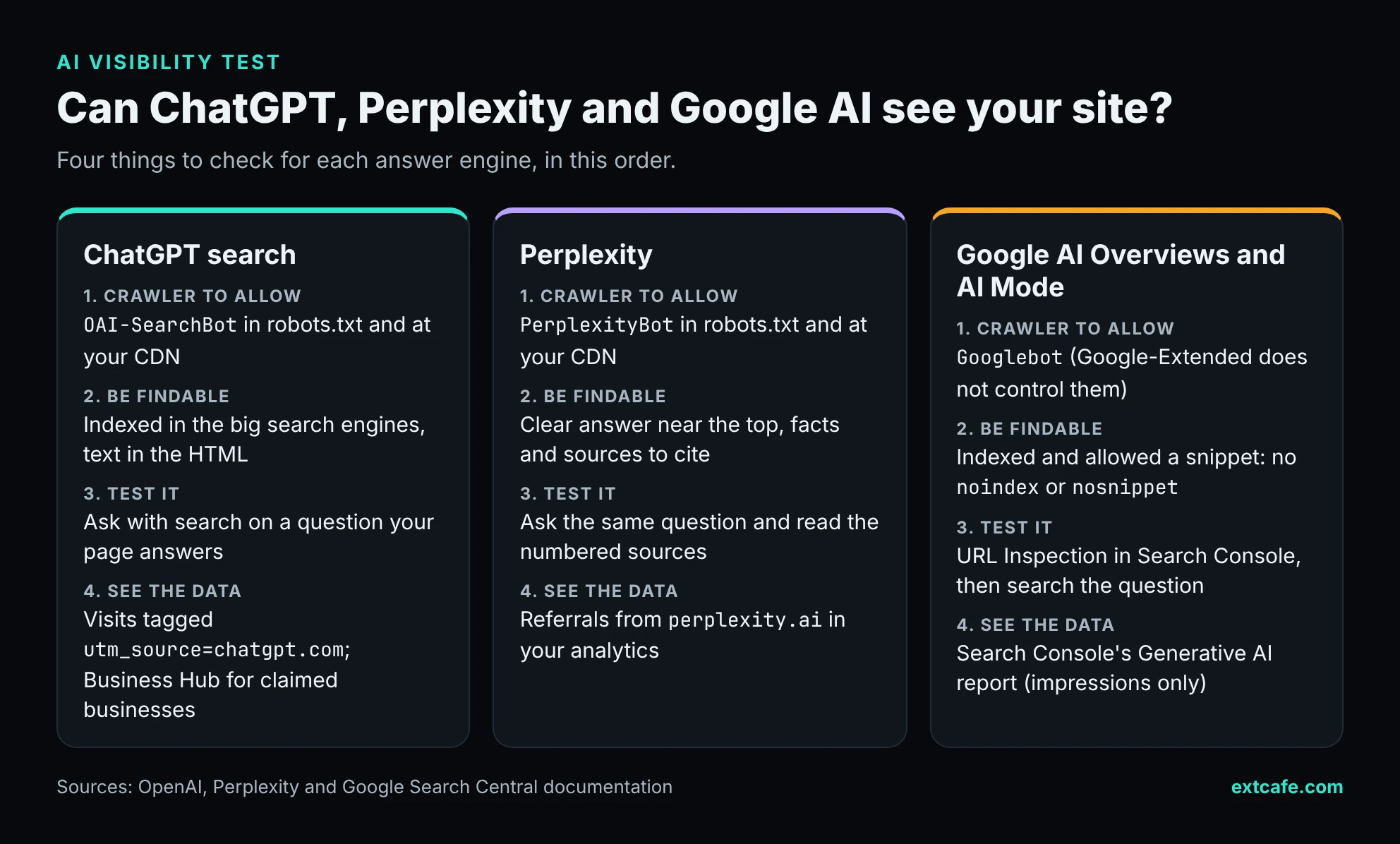
Why does each AI engine need its own check?
Each AI answer engine finds pages its own way, so passing one test doesn't mean you pass the others.
- ChatGPT search uses OpenAI's own crawler,
OAI-SearchBot, and also draws on third-party search providers. OpenAI's crawler documentation says sites that block OAI-SearchBot won't be shown in ChatGPT search answers, though they can still appear as plain navigation links. - Perplexity uses
PerplexityBotfor its search results. Perplexity's crawler page says it is not used to train foundation models. - Google AI Overviews and AI Mode are part of Google Search. Google's guide to its generative AI features says a page must be indexed and allowed to show a snippet, and that there are no extra technical requirements.
One more thing to know before you start: without web search, a chatbot answers from its training data, which has a cut-off date. A new or recently changed page can only show up in answers that search the web, so always test with search turned on.
Step 1: Is your robots.txt or CDN blocking AI search crawlers?
This is the most common cause, and the quickest to check. Open yoursite.com/robots.txt in a browser and look for three things:
- A
User-agent: OAI-SearchBotorUser-agent: PerplexityBotgroup withDisallow: /. That blocks the whole site for that engine. - A
User-agent: *group withDisallow: /. That blocks every crawler that has no group of its own, including AI search crawlers. - A block on
Googlebot. That removes you from Google Search, and so from AI Overviews too.
Blocking GPTBot or Google-Extended is a different choice. GPTBot is OpenAI's training crawler, and Google-Extended controls whether Google can use your content for Gemini model training and grounding. Google says Google-Extended doesn't affect inclusion in Google Search, so it doesn't control AI Overviews. You can block training and still allow AI search. Our guide to blocking AI training but allowing AI search has a copy-ready file.
Then check your CDN or firewall. Some hosts and CDNs have a one-click "block AI bots" switch that also blocks search crawlers. If your server logs show no requests from OAI-SearchBot or PerplexityBot over a few weeks, that switch is a likely reason.
Step 2: Is your main text in the HTML?
Many AI crawlers read the HTML your server sends and don't run JavaScript. If your page builds its text in the browser, they may see an almost empty page.
- Open the page and press Ctrl+U (Cmd+Option+U on a Mac) to view the source.
- Search the source (Ctrl+F) for a sentence from the middle of your main content.
- If it isn't there, the text is added by JavaScript. Ask your developer to render the main content on the server, or use static or pre-rendered pages.
Step 3: Is the page indexed and allowed a snippet?
For Google, this is the whole technical requirement. Open Google Search Console, paste the page address into the URL Inspection bar at the top, and check that it says the URL is on Google. Then look in the page's HTML for these tags, which stop a page from being used:
noindexin a robots meta tag or anX-Robots-Tagheader: the page is left out of Google entirely.nosnippet, or a very smallmax-snippetvalue: Google can't show text from the page, which also limits its use in AI Overviews.- A canonical tag pointing to another URL: Google may index that other page instead.
Do the same in Bing Webmaster Tools. Bing powers Copilot, and a page that is missing from the big search indexes is harder for any AI tool to find.
Step 4: How do I test each engine with real questions?
Write down three questions your page answers, in the words a customer would use. Then ask each engine:
- ChatGPT: make sure search is on (you will see sources under the answer), ask the question, and open the source list.
- Perplexity: ask the same question and read the numbered sources next to each sentence.
- Google: search the question. If an AI Overview appears, open its links. In AI Mode, look at the links beside the answer.
Note which sites are cited. If competitors appear and you don't, open their pages and compare: do they answer the question in the first lines, show numbers or steps, name an author, and cite sources? AI answers vary from person to person and from day to day, so run each question two or three times before you draw conclusions.
You can also check whether a tool knows your brand: ask "What is [your brand]?" with search on. A wrong or empty answer usually means few other sites mention you, which is a reputation problem, not a technical one.
Step 5: What data does each engine give you?
- Google: Search Console's Generative AI report shows impressions from AI Overviews and AI Mode by page, country, device and date. It has been open to all sites since 31 August 2026. It doesn't show clicks or queries. See how to use the Generative AI report.
- Copilot and Bing: Bing Webmaster Tools' AI Performance report shows how often your pages are cited and the grounding queries behind them.
- ChatGPT: many links from ChatGPT carry
utm_source=chatgpt.com, so look for it in your analytics. Since 10 November 2026, businesses can also claim a listing in the ChatGPT Business Hub (beta) and see aggregated mention and click counts. - Perplexity: look for referrals from
perplexity.aiin your analytics. Perplexity has no site-owner report.
AI tools often strip the referrer, so analytics undercounts AI visits. Our guide on tracking AI search traffic and citations covers the details.
The whole test on one page
| Check | ChatGPT search | Perplexity | Google AI Overviews and AI Mode |
|---|---|---|---|
| Crawler to allow | OAI-SearchBot | PerplexityBot | Googlebot |
| Blocking this only stops training | GPTBot | None listed (PerplexityBot isn't a training crawler) | Google-Extended |
| Must be indexed? | Helps: it also uses third-party search providers | Its own index | Yes, and allowed a snippet |
| Where to see data | Analytics (utm_source=chatgpt.com), Business Hub | Analytics referrals | Search Console Generative AI report |
What should I do if my site isn't showing up?
Fix the steps above in order, because each one blocks everything after it. Once the technical checks pass, the rest is about the page itself:
- Put a one or two sentence answer right under each question heading. AI answers quote passages, not whole pages.
- Add specifics a model can cite: numbers, dates, prices, steps and links to primary sources.
- Show who wrote the page, with a byline, an About page and contact details. See what E-E-A-T is.
- Earn mentions on other sites, such as reviews, directories and articles. Our 7 reasons a site isn't showing in ChatGPT covers each cause in detail.
Be wary of anyone who promises guaranteed AI citations, or who says you need special AI files. Google says its AI features need no special files such as llms.txt, and no AI engine has said that it ranks pages by such a file.
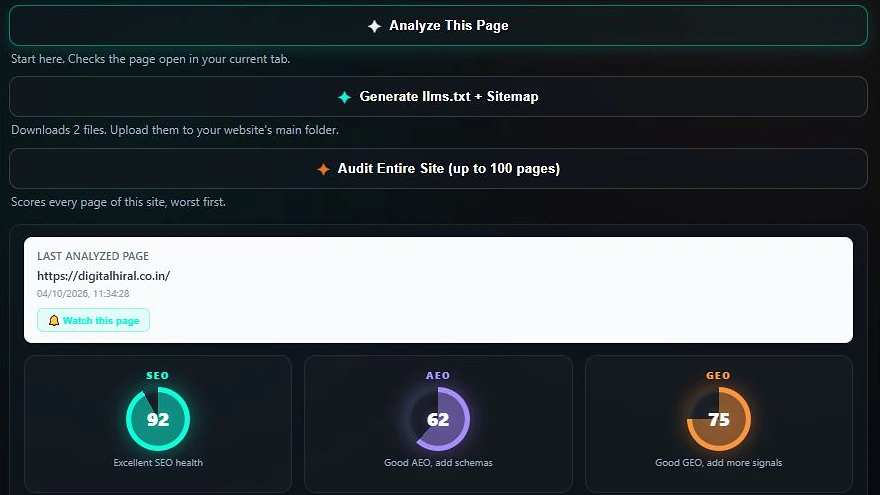
Run steps 1 and 2 in one click
SEO AI Assistant is a free Chrome extension that checks your robots.txt against 10 AI search crawlers, compares the server HTML with what the page shows after JavaScript runs, and flags a missing answer up top, a missing author and missing sources. It runs 39 checks from Chrome's side panel, needs no account, and shows how many points each fix adds. See how the scores work.
AI visibility questions
How do I know if ChatGPT can see my website?
Check that robots.txt and your CDN allow OAI-SearchBot, that your main text is in the page HTML, and that the page is indexed in the big search engines. Then ask ChatGPT, with search on, a question your page answers and look at the sources it lists.
How do I get cited by Perplexity?
Allow PerplexityBot in robots.txt and at your CDN, then make the page easy to quote: a direct answer under each question heading, specific facts and numbers, a named author and links to sources. Perplexity decides what to cite, so nobody can guarantee a citation.
Do I need to do anything special for Google AI Overviews?
No. Google says a page only needs to be indexed and allowed to show a snippet. Normal SEO applies, and you don't need special files or markup for AI features.
Does blocking Google-Extended remove me from AI Overviews?
No. Google says Google-Extended doesn't affect inclusion in Google Search, and AI Overviews are part of Search. To leave AI Overviews and AI Mode, use the Search generative AI setting in Search Console, which also removes the traffic they send.
Why does ChatGPT give different sources each time I ask?
AI answers are generated fresh for each question and can vary by wording, location and time. Ask each test question two or three times and look for patterns rather than one result.
Can I see how often AI tools cite my site?
Partly. Bing Webmaster Tools shows citations in Copilot and Bing AI answers, Search Console shows AI Overview and AI Mode impressions, and claimed businesses can see ChatGPT mention and click counts in the Business Hub. Perplexity has no site-owner report.
Does llms.txt help AI tools see my website?
Not in any confirmed way. Google says it doesn't use the file for Search, and no AI search provider has said it uses llms.txt to choose sources. Allowing the right crawlers and writing clear pages matters far more.
How long does it take for a fixed page to appear in AI answers?
There is no published timeline. OpenAI says robots.txt changes take about 24 hours to be picked up; after that the page still needs to be crawled again and chosen as a source.