SEO score
Page title, meta description, H1, image alt text, canonical, HTTPS, Open Graph, Twitter Card and broken links.
New in 1.4.2 See what each fix is worth
Score any page from 0 to 100 for SEO, AEO and GEO in one click. Check the page signals that help ChatGPT, Perplexity, Claude and Google AI Overviews read and quote it, then copy the fix.
No account needed for the free plan. Pro is $5 per month with a 3-day free trial. Requires Chrome 116 or newer.
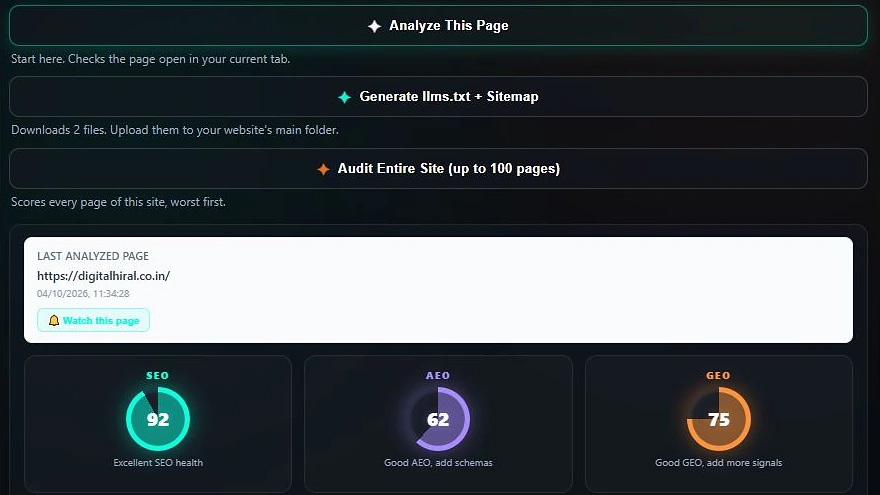
SEO AI Assistant is a free Chrome extension by ExtCafe that audits the page you are viewing and gives it SEO, AEO and GEO scores from 0 to 100, so you can fix what search engines and AI assistants struggle to read.
Everything below is free and needs no account. Each score has its own column of checks, so you can see exactly what to fix first. Each score is the share of its checks a page passes; see how every check works.
Each failed check now shows how many points fixing it adds to its SEO, AEO or GEO score, so you can spend your time on the changes that move the number most.
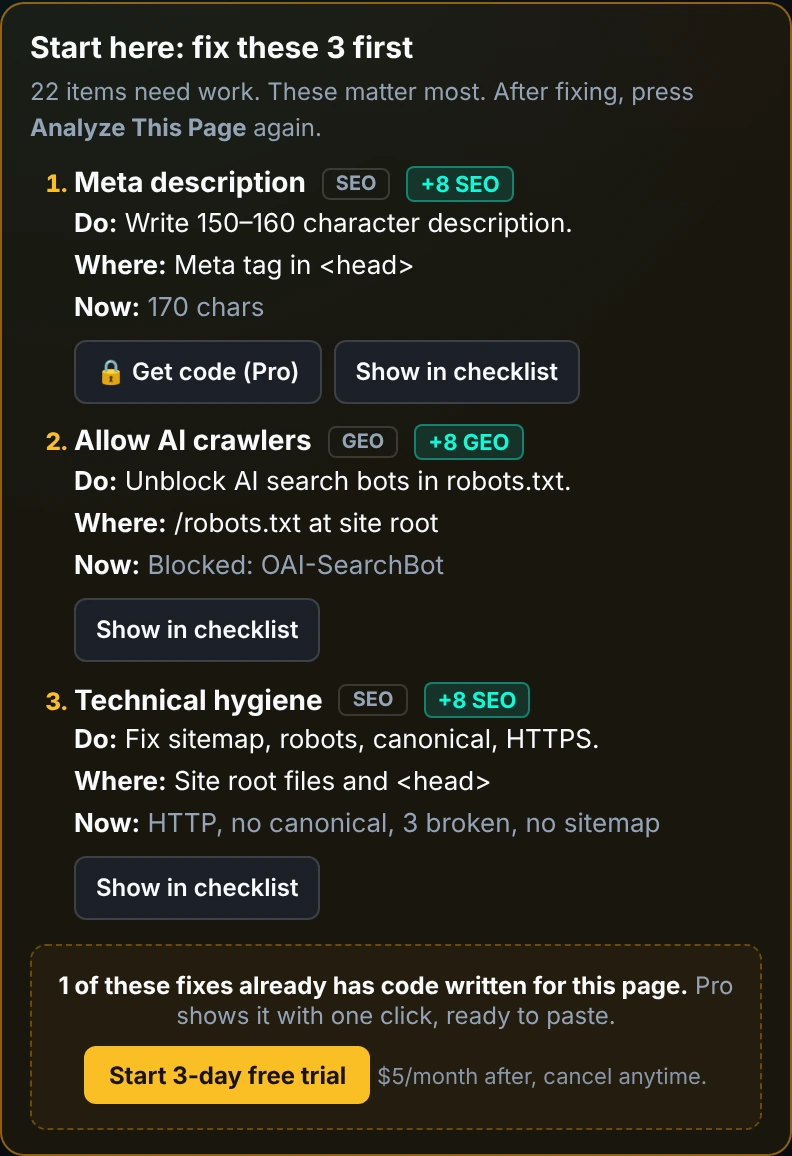
Page title, meta description, H1, image alt text, canonical, HTTPS, Open Graph, Twitter Card and broken links.
13 answer engine checks, including answer-first structure, question headings, an FAQ section, concise definitions and freshness.
13 generative engine checks, including citations, original data, expert authorship, AI crawler access, llms.txt and a changelog.
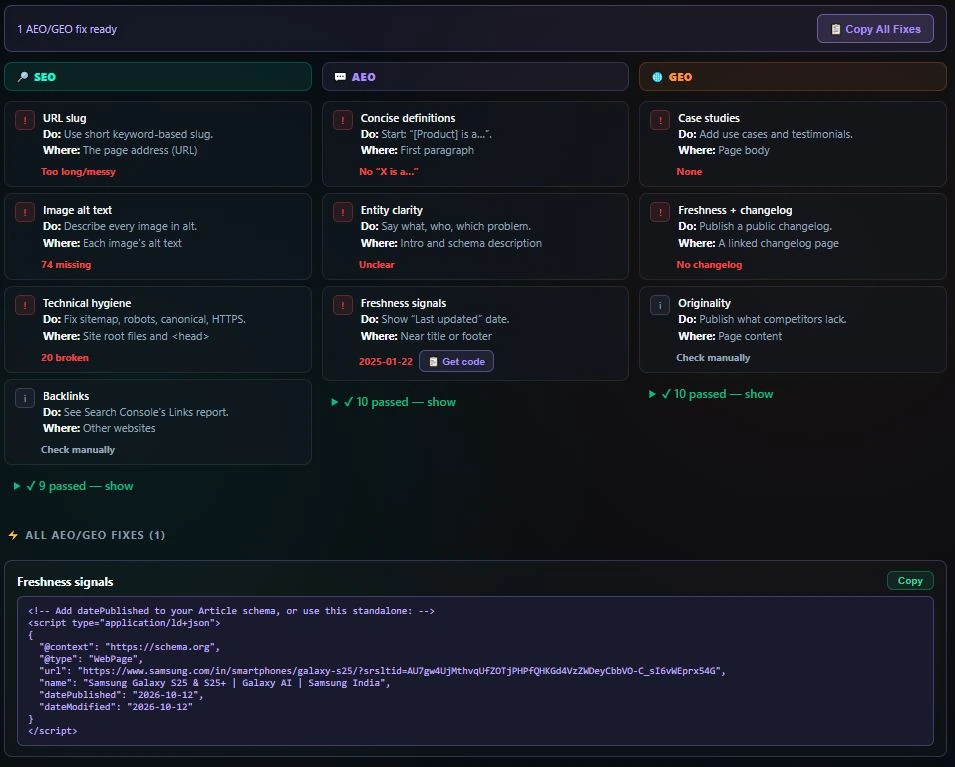
SEO, AEO and GEO checks sit side by side. Every failed check says what to do and where, and passed checks fold away, so the weak spot is obvious at a glance.
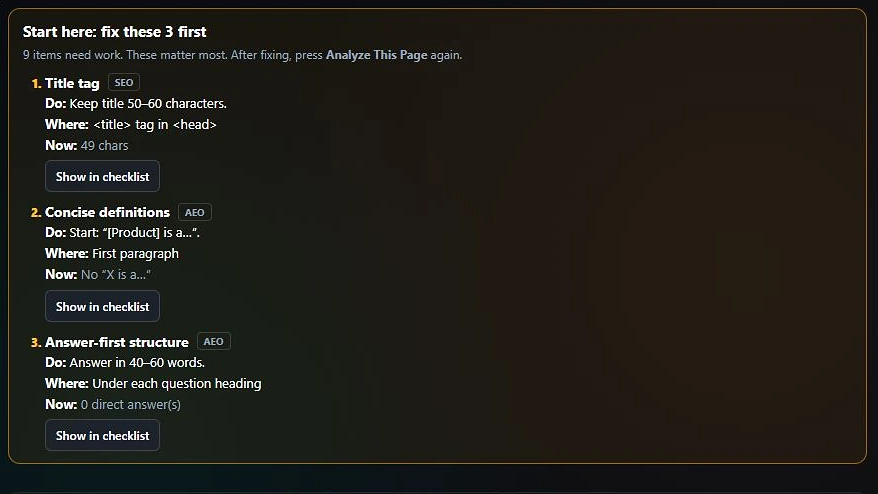
After every scan, a Start here card picks the three fixes that matter most and says what to do, where to do it and what the page has now.
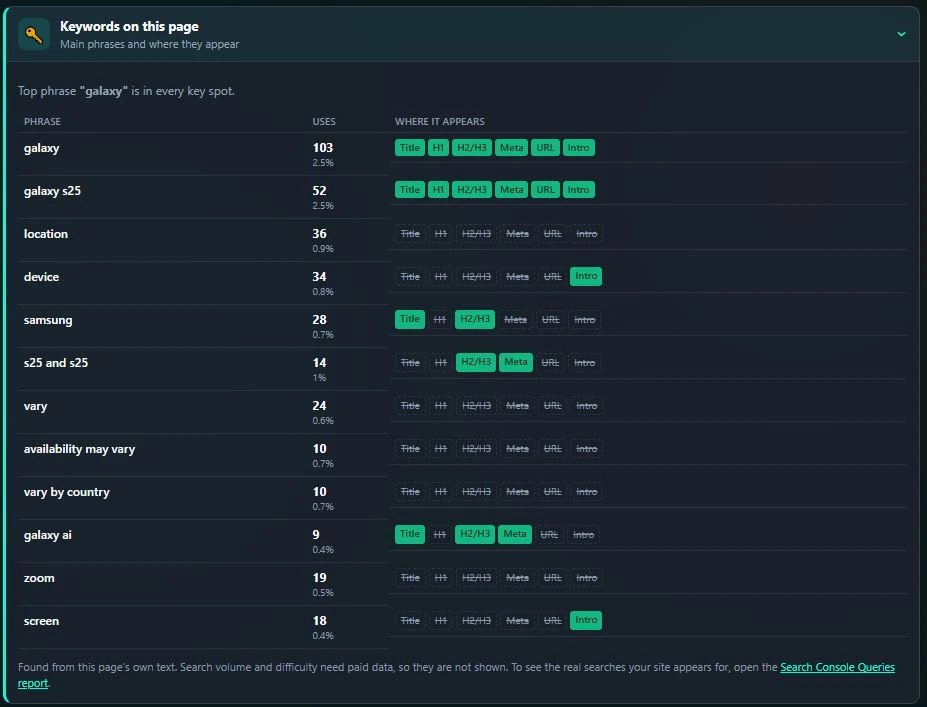
The Keywords card lists the phrases your page uses most and shows whether each one is in the title, H1, headings, meta description, URL and intro, so you can tell at a glance if the page is about what you think it is.
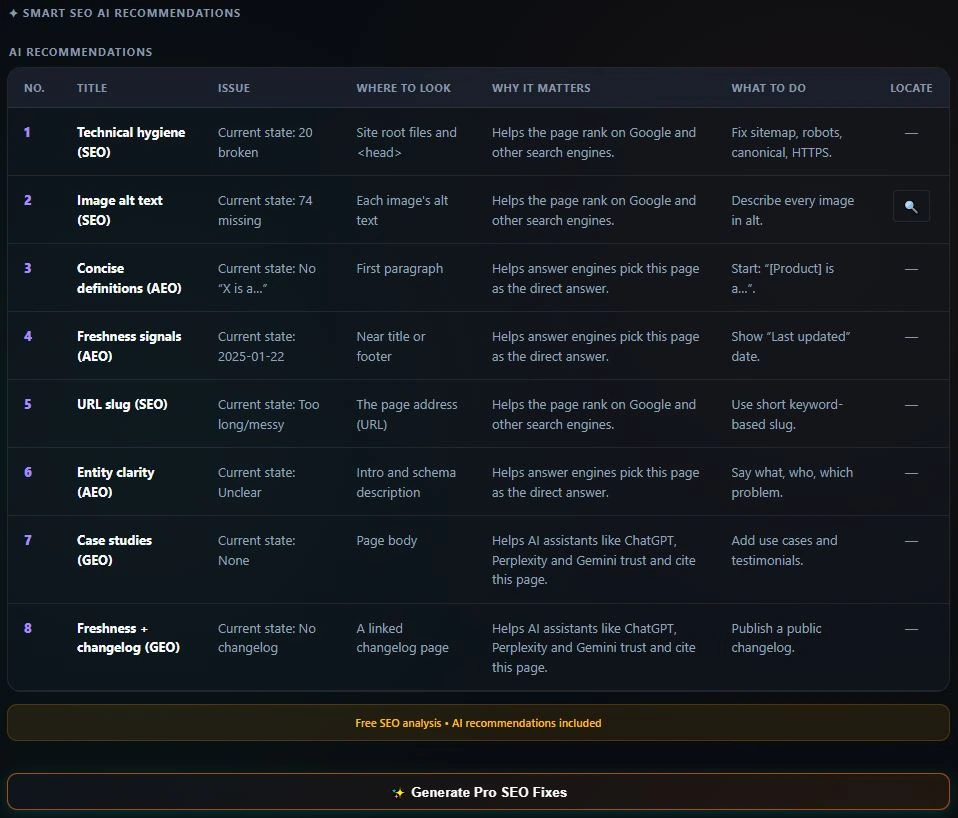
Each issue comes with why it matters and what to do. Highlight on page jumps to the exact broken element and outlines it.
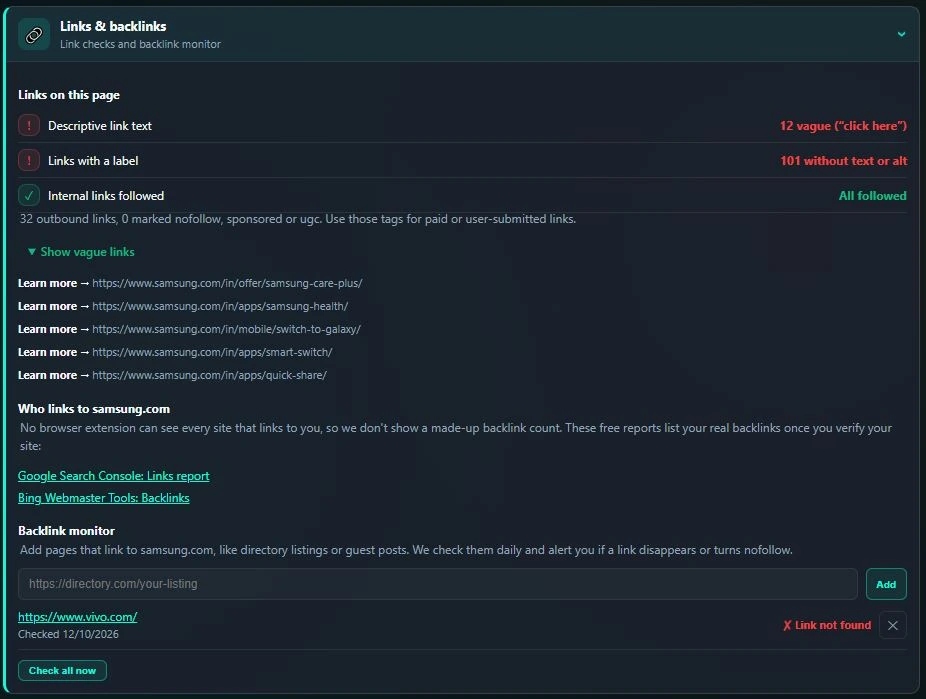
The Links & backlinks panel flags vague link text such as "Learn more", links with no label, and internal links marked nofollow. Instead of a made-up backlink count, it points you to the free Links reports in Google Search Console and Bing Webmaster Tools.
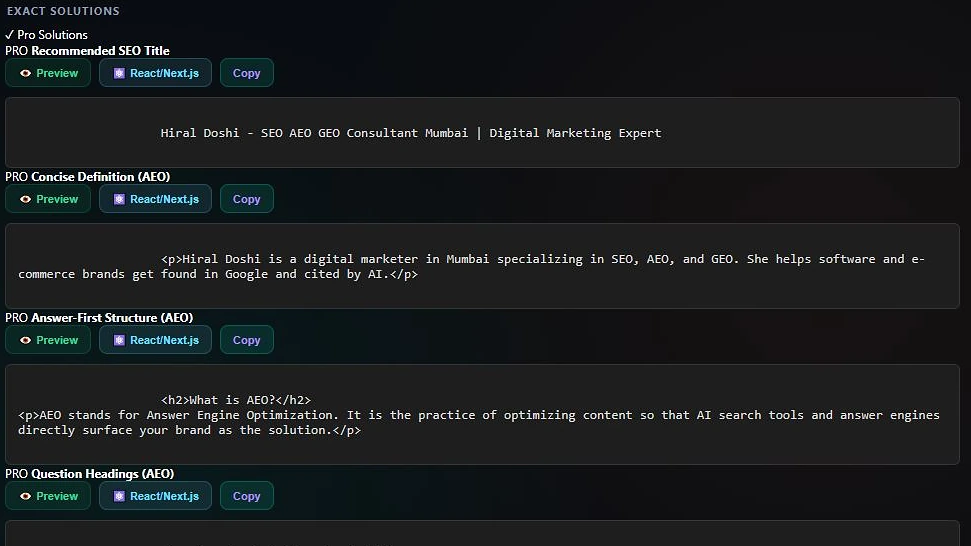
Pro turns findings into fixes and tracks progress over time. It costs $5 per month and starts with a 3-day free trial.
AEO and GEO fixes are generated the moment a scan finishes, and Copy All Fixes puts every one on your clipboard in a single paste.
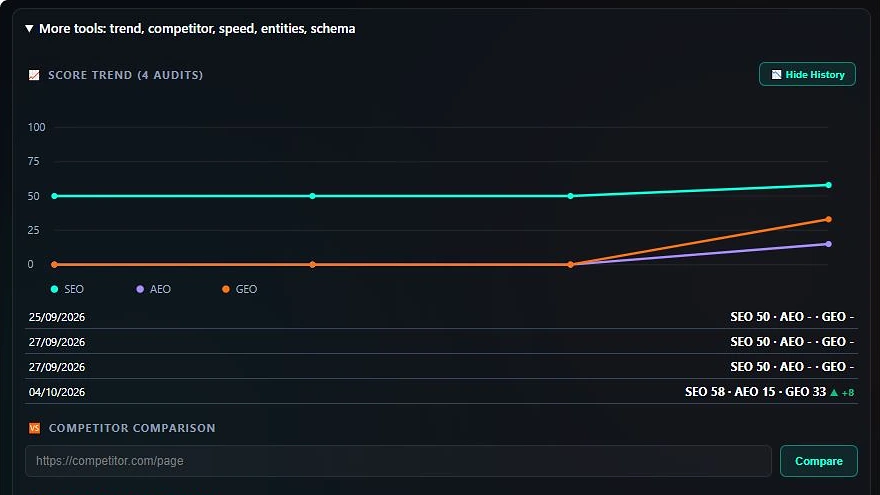
Plot SEO, AEO and GEO across every past audit of the same page, drawn as an inline chart with no external chart library.
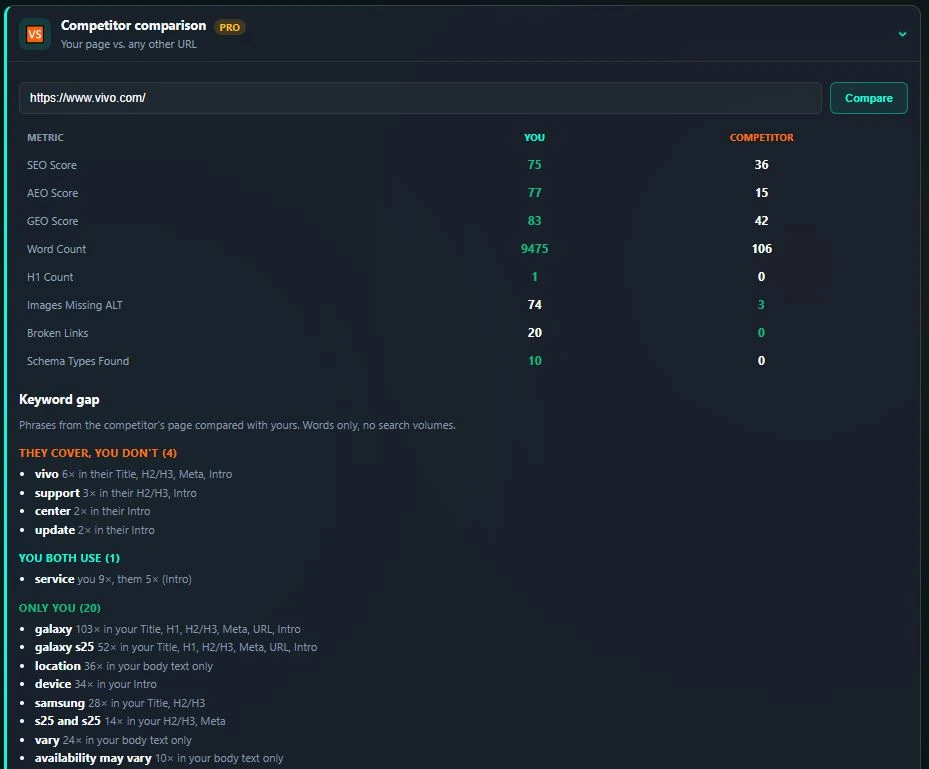
Paste a competitor URL to get a side-by-side comparison with the current page, covering scores, word count, schema coverage and broken links, plus a keyword gap that lists the phrases their page covers and yours doesn't.
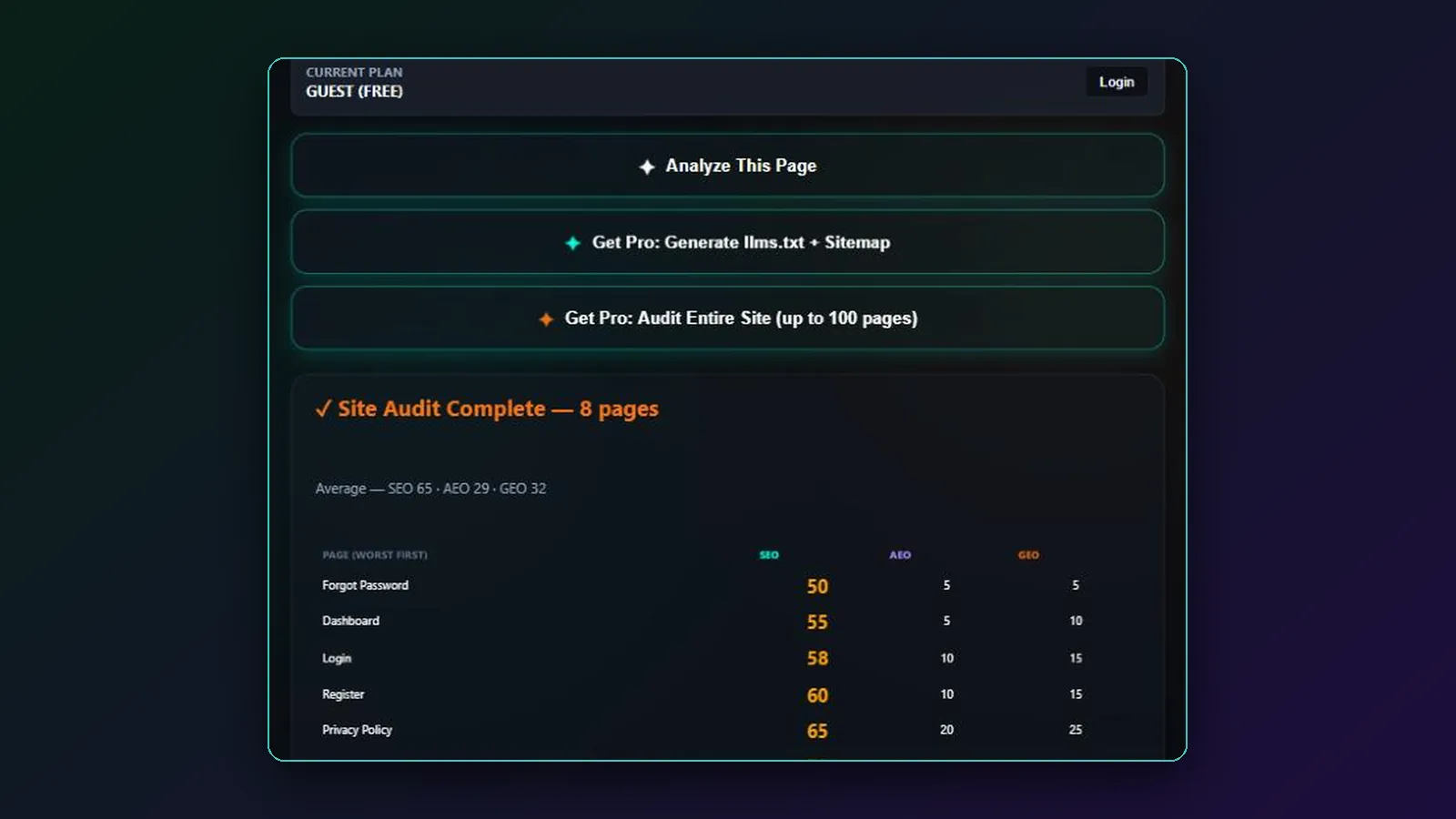
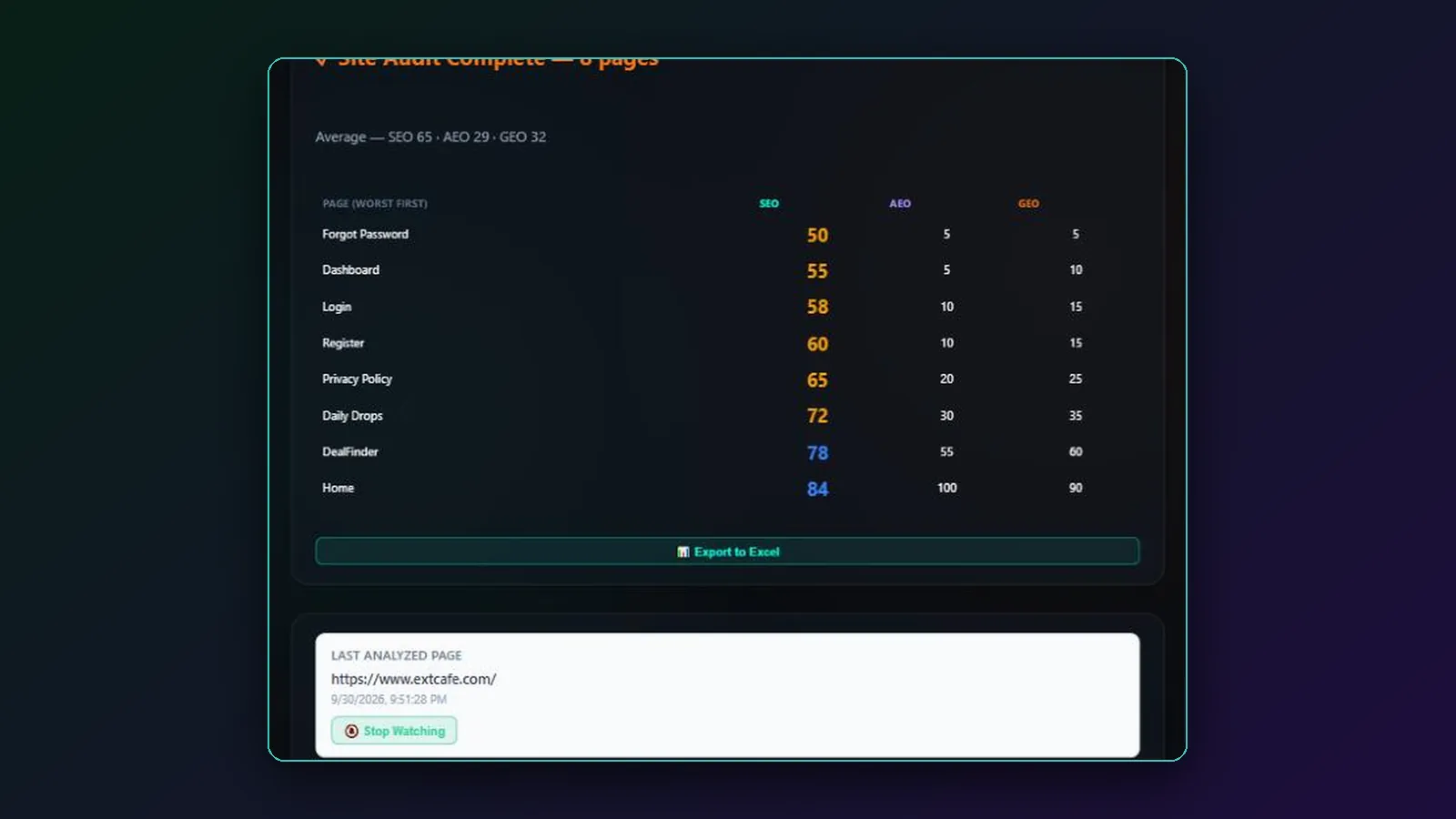
Score the first 100 pages discovered on the current domain in one pass. Results are sorted worst first and can be exported to Excel.
Opt any page into a daily background re-check. A local desktop notification appears only if the score drops, and nothing happens otherwise. No server is involved.
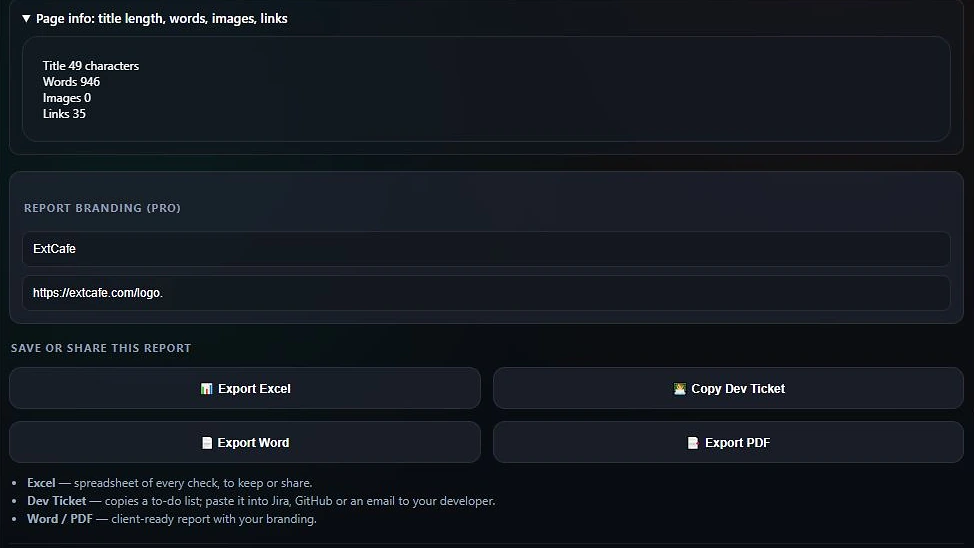
Add your agency name and logo to exports. Reports include the full SEO, AEO and GEO results, the generated solutions and every fix snippet, not only a summary.
A full audit takes under three minutes. Install the extension, open a page, press Analyze This Page and work through the results.
Add SEO AI Assistant: SEO Checker, AEO & GEO Audit from the Chrome Web Store. No account is needed for the free plan.
Go to your site, a client page or a competitor page in Chrome.
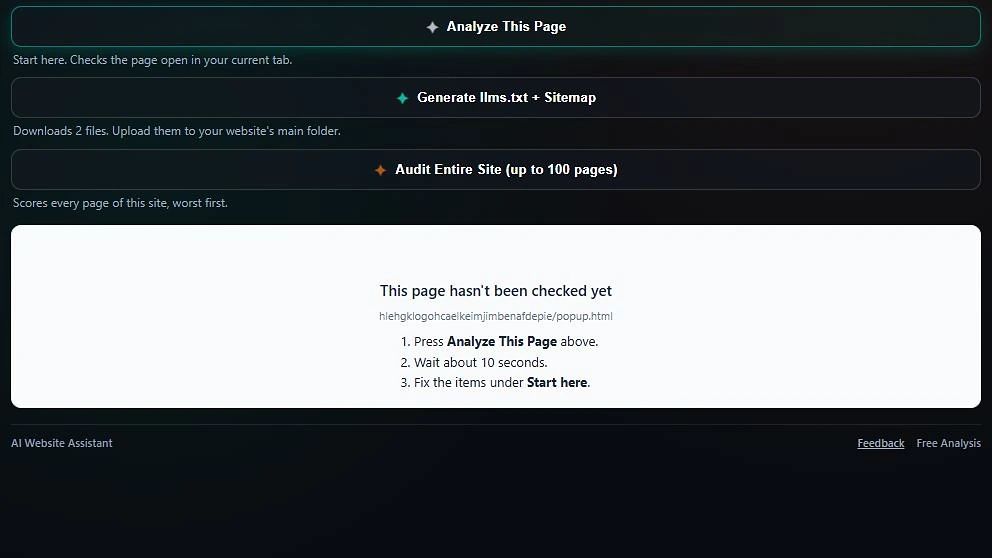
Click the toolbar icon or press Alt+Shift+S to open the side panel, then press Analyze This Page to run 39 checks locally.
Review the SEO, AEO and GEO gauges, plus the page-speed estimate, the page's main keyword phrases and detected schema.
Use the three-column grid and the recommendations to find and locate each issue.
Copy a dev ticket, export to Excel, or on Pro copy every generated fix and export Word or PDF reports.
The side panel opens in guest mode with the Analyze This Page button ready. Log in only when you want Pro features.
Not if a robots.txt rule blocks AI search crawlers, the text only loads with JavaScript, or the page has no clear answer up top. SEO AI Assistant checks all three for free. These guides explain each fix.
Seven causes, from a blocked search crawler to JavaScript-only text, and how to check and fix each one.
A copy-ready robots.txt that stops model training without hiding your site from AI answers.
A priority order for fixes, and how points per fix show what each change is worth.
How to show trust with a byline, an About page, contact details and sources.
What Google says a page needs, how to write answers it can quote, and how to check if you appear.
Measure visits and citations from ChatGPT, Copilot and Google AI features with free tools.
SEO AI Assistant is rated 5.0 out of 5 stars from 6 ratings on the Chrome Web Store as of 10 Oct 2026. That is a small sample, so read the full reviews on the Chrome Web Store.
After using it I got to know what are the fault in my website and helped me a lot solving that stuff.
It is a massive upgrade over traditional SEO auditing extensions.
The professional client ready pdf it gives is exceptional and has saved ton of time of mine as a freelancer!
Pro costs $5 per month with a 3-day free trial. The free plan has no time limit, and DealFinder is always free.
$0
For quick audits and handing issues to a developer.
$5 per month, 3-day free trial
Everything in Free, plus:
Scores are calculated locally and your data is never sold. Here is what the extension accesses and why. Read the full privacy policy.
It reads the HTML of the page you are viewing, such as titles, headings, meta tags, images and links, so it can score that page.
Analysis history and settings stay in your browser's local storage on your device.
The free plan needs no account. A Pro account stores your email, a hashed password and your subscription status.
Each Analyze sends a page summary (URL, title, meta description, counts and check results, not the page text) to ExtCafe to return recommendations. Pro AI fixes also use NVIDIA's AI API. Exact list.
ExtCafe builds focused Chrome extensions for SEO, website change tracking and shopping.
 New
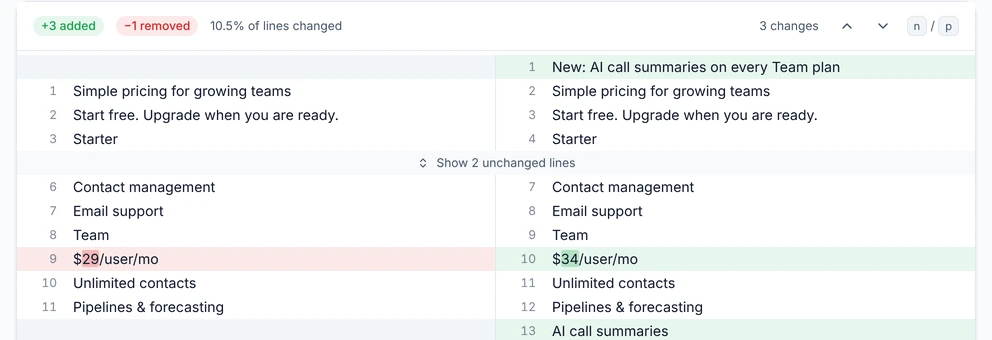
NewTrack changes to any web page and compare versions: text, HTML, SEO tags, AEO/GEO signals and screenshots. Data stays on your device. Guide: how to get an alert when a web page changes.
Free SEO, AEO and GEO audits with Pro fixes and reports.
View on Chrome Web StoreA free Chrome extension that compares prices between Amazon.in and Flipkart for Indian shoppers.
Explore DealFinderVersion 1.4.2 is the current release on the Chrome Web Store. Recent updates are listed below.
Four new blog guides explain the checks behind 1.4.2: why a website is not showing in ChatGPT, how to block AI training but allow AI search, which SEO fix to do first and what E-E-A-T is. A new About page names the person behind ExtCafe.
Every failed check now shows how many points fixing it adds to its score, so you can see what each fix is worth. The AI crawler check now covers 10 AI search crawlers, including OAI-SearchBot, Claude-SearchBot and PerplexityBot. Blocking a training-only crawler such as GPTBot or CCBot is listed but no longer costs points, because it does not stop AI search from citing you. Expert authorship now also looks for a visible byline, an About page link and contact details, and the three trust checks (Expert authorship, Citations, Third-party mentions) are labelled E-E-A-T. These two GEO checks are described on How scores work, so some GEO scores will change.
The free Excel export still lists your scores, every check with pass or fail, and each issue found. The full fix plan for each issue (where to look, why it matters and what to do) is now part of Pro, and Pro exports add an AI-ready prompt per issue that you can paste into your AI assistant.
A new Keywords card lists the page's main phrases and shows whether each is in the title, H1, headings, meta description, URL and intro, and flags overused ones. Pro competitor comparison now adds a keyword gap: the phrases a competitor's page covers that yours doesn't. Free accounts can now try AI fixes, competitor comparison, the site audit and llms.txt once each before paying. Both work from the pages' own text; search volumes are not guessed. The extra tools (score trend, competitor comparison, links, page speed, keywords and schema) now each have their own card instead of hiding behind one toggle. llms.txt and sitemap.xml have separate buttons, and llms.txt is now built from your pages' own descriptions, structured data and text, with llms-full.txt alongside it. A new Links & backlinks panel flags vague link text, unlabelled links and internal nofollow links. Instead of a made-up backlink count, it links to the free Links reports in Google Search Console and Bing Webmaster Tools. Pro users can list the pages that link to them and get an alert if a link disappears or turns nofollow. Scores are unchanged.
The script that keeps you logged in now runs only on extcafe.com. The localhost and 127.0.0.1 matches used during development were removed from the store version. No features changed.
Every one of the 39 checks, how it passes and whether it is a measured or heuristic check is now documented on How scores work. The privacy policy lists exactly what is sent on each Analyze.
Each score now comes from 13 checks, including answer-first content, AI crawler access, llms.txt, citations and freshness. Every failed check shows a five-word fix tip.
The extension now opens in Chrome's side panel beside the page and stays open as you switch tabs. It works with the keyboard, screen readers and browser zoom, opens with Alt+Shift+S, and can show any saved audit as a full-page report.
Pages now get dedicated AEO and GEO scores alongside SEO, based on 12 AEO checks and 11 GEO checks.
Pro users can brand Excel, Word and PDF exports with a custom agency name and logo.
A new free extension that compares Amazon.in and Flipkart prices from the toolbar.
32 answers about SEO AI Assistant, SEO, AEO, GEO and getting cited by AI search.
SEO AI Assistant is a free Chrome extension by ExtCafe that audits the page you are viewing and gives it SEO, AEO and GEO scores from 0 to 100. It runs 39 checks, flags what is missing, explains why it matters and, on Pro, generates the fixes for you.
It is built for SEO professionals, agencies, freelancers, content teams, developers and site owners who want a fast on-page audit without leaving the browser. Developers can copy issues as a Jira or GitHub ticket, and agencies can export white-label Word and PDF reports on Pro.
It runs a 39-point checklist, 13 checks per column. SEO covers title and meta description length, URL slug, headings, keyword placement, alt text, page speed, mobile layout, schema, internal links and technical hygiene. AEO covers answer-first structure, question headings, an FAQ of 8 or more questions, definitions, lists, how-to content and freshness. GEO covers citations, original data, authorship, AI crawler access in robots.txt, llms.txt, crawlable text and a public changelog. Each failed check shows a five-word fix tip.
Yes, it checks readiness. The AEO and GEO scores measure how clearly an AI assistant could read, summarize and cite your page, using signals such as structured data, direct-answer content, headings, llms.txt and authorship. It cannot guarantee that any AI engine will cite you, and it does not track whether chatbots currently mention your brand.
Both. The free plan finds issues, explains why each matters, shows what to do, highlights the broken element on the page and lets you copy a dev ticket. Pro goes further and generates the fixes for you, such as JSON-LD, meta titles, meta descriptions, alt text and HTML snippets, with a single Copy All Fixes action.
Yes, on Pro. The Discovery Bundle generates llms.txt and sitemap.xml for a domain, and AEO and GEO fixes such as FAQ, Article or Organization JSON-LD are generated automatically after each scan. Review every generated file or snippet before you publish it on your site.
SEOquake is a long-standing SEO toolbar known for search result overlays and page metrics. SEO AI Assistant is built around scoring each page for SEO, AEO and GEO and, on Pro, generating the fixes instead of only flagging problems. The tools overlap, so check each listing for its current features before you choose.
Detailed SEO Extension focuses on showing a page's SEO details, such as meta tags, headings, links and structured data, in one view. SEO AI Assistant adds 0 to 100 scores for SEO, AEO and GEO, plain-English recommendations and, on Pro, generated fixes, reports and monitoring. Check each tool's listing for its current features.
SEO AI Assistant reads only the page you choose to analyze and never reads form inputs or passwords. All 39 checks and the scores are calculated in your browser, and your history stays in local storage. Each Analyze sends a page summary (URL, title, meta description, counts and check results, not the page text) to the ExtCafe server to return recommendations, and it is not saved to a database. Pro AI fixes also pass that summary to NVIDIA's AI API. Your data is never sold.
Yes. The free plan gives you the full SEO, AEO and GEO scores, every check in the three-column grid, Core Web Vitals, Excel export, one-click dev ticket copy and local history. No account or card is needed.
Install it from the Chrome Web Store, open the page you want to audit, click the toolbar icon and press Analyze This Page. Read your three scores, review the flagged checks, then copy a dev ticket for Jira or GitHub or export the results to Excel.
Pro costs $5 per month, billed through Polar, and starts with a 3-day free trial. It adds automatic AEO and GEO fixes, AI-generated meta titles, descriptions and alt text, the Discovery Bundle, score trend charts, competitor comparison, site-wide audits, page watching and white-label reports.
Yes. Pro is a monthly subscription handled by Polar, so you can cancel before the next billing date. The 3-day free trial lets you try Pro features first.
No. SEO AI Assistant is a Chrome extension that works on any public web page, including WordPress, Shopify and custom sites. A WordPress plugin is not available.
SEO helps pages rank in search results. AEO, answer engine optimization, helps your content be chosen as a direct answer, such as a featured snippet or voice answer. GEO, generative engine optimization, helps AI systems like ChatGPT, Perplexity and Google AI Overviews understand, summarize and cite your content. They share many fundamentals.
Yes. AI search features rely heavily on pages that search engines can already crawl, index and trust, so technical SEO, quality content and authority still matter. AEO and GEO build on that foundation by making answers easier to extract and attribute. Treat them as extra layers, not replacements.
Google says the same fundamentals apply: make sure your pages are crawlable, indexed and eligible to show a snippet, then publish helpful, original content that answers real questions clearly. Use descriptive headings, put the answer first, add structured data that matches visible content and keep page experience strong. No special markup is required.
Target a specific question, use it as a heading, then answer it directly in about 40 to 60 words right below. Follow with a list, steps or a table where the format fits. Win the snippet by matching the question's intent, keeping the answer concise and ranking well already for that query.
Use one clear topic per page, descriptive headings (ideally phrased as questions), a direct answer in the first sentences, then supporting detail. Keep paragraphs short, use lists and tables for steps and comparisons, define terms plainly and state specific facts such as numbers, dates and names.
Less than it once did for rich results, since Google limited FAQ rich results in 2023 to a small set of authoritative sites. FAQ schema still gives machines a clean, labeled question and answer structure, and it can support AI understanding. It must match the visible FAQ text exactly, and the visible content matters most.
Fix anything that stops the page being indexed first, such as a stray noindex tag, a robots.txt block or a wrong canonical. Then improve the title and meta description, then make sure the page answers the search. SEO AI Assistant shows how many points each failed check is worth, so you can start with the fixes that help most. Guide: Which SEO fix should you do first?
There is no guaranteed method, but you can improve your odds. Let OpenAI's search crawler (OAI-SearchBot) reach your site, make sure your pages are indexed and crawlable, publish clear, original, well-sourced answers, and earn mentions on reputable third-party sites. Cited pages tend to be authoritative, specific and easy to quote.
Perplexity cites sources it finds on the open web, so allow PerplexityBot, keep key pages fast and crawlable, and publish content that answers specific questions with clear facts. Consistent brand and entity details, fresh updates and mentions from credible third-party sites all improve the chance that your brand appears.
Common reasons are blocked AI crawlers, pages that are not indexed, important content that only appears after JavaScript runs, thin or generic content, a new site with little authority, or a brand name that is ambiguous. Check robots.txt, index status and rendered HTML first, then strengthen your content and third-party mentions.
Ask ChatGPT, Perplexity, Gemini and Google AI Overviews the questions your customers ask, using fresh sessions, and record whether your brand or pages are cited. Repeat monthly, review referral traffic from AI sites in your analytics, and look for AI crawler user agents in your server logs.
Content that is specific, accurate and easy to quote: clear definitions, step-by-step guides, comparison tables, original data or first-hand experience, named authors, cited sources and visible update dates. Pages that answer one question well tend to be cited more than broad pages that only repeat common advice.
Pick a narrow niche and answer its specific, long-tail questions better than larger sites do. Add original experience, data or examples, use clear structure and structured data, keep your brand details consistent, and earn mentions from relevant sites. Smaller sites can win by being the most useful source for one topic.
The most common cause is a robots.txt rule or a CDN setting that blocks OAI-SearchBot, the crawler ChatGPT search uses. Other causes are pages that are not indexed, text that only loads with JavaScript, and pages without a clear answer, facts or sources. Guide: Why is my website not showing in ChatGPT?
llms.txt is a proposed plain-text file at your site's root that summarizes your site and links to your key pages in a format easy for language models to read. It is optional, and no major AI search provider has publicly committed to using it for ranking. It is cheap to add, so many sites publish one.
It depends on your goal. If you want to be cited in AI answers, allow search-focused crawlers such as OAI-SearchBot and PerplexityBot. Blocking training crawlers such as GPTBot or Google-Extended is a separate choice about model training, and Google-Extended does not affect Google Search. Decide per bot and review the list regularly.
Often not. Googlebot renders JavaScript, but many AI crawlers fetch only the raw HTML and may never see content that loads after scripts run. Put important text, headings and structured data in the initial server-rendered HTML, and use view-source or a no-JavaScript check to confirm it is present.
Organization and WebSite markup identify who you are, Article or BlogPosting with an author supports content credibility, FAQPage and HowTo describe questions and steps, Product suits shop pages, and BreadcrumbList clarifies structure. Use only types that match visible content, keep it valid, and remember no markup guarantees a citation.
Install SEO AI Assistant free from the Chrome Web Store and see your SEO, AEO and GEO scores.