How to Read and Fix a Low SEO Score, Check by Check
Short answer: An SEO score out of 100 is a checklist result, not a ranking. In SEO AI Assistant, the SEO score is the share of 12 measurable checks a page passes, so each fixed check adds about 8 points. To fix a low score, look at the failed checks, do any that affect indexing first (HTTPS, canonical, broken links, robots.txt and sitemap), then the quick wins: title length, meta description, one H1 with H2 sections, image alt text and schema. Re-check after each change.
A low score feels like a verdict, but it is really a to-do list. This guide explains how to read the score, then goes through every scored check in SEO AI Assistant's SEO column with what it tests, why it matters and how to fix it. Other tools use different checklists and weights, so their numbers won't match ours, but the fixes are the same.
How do I read an SEO score?
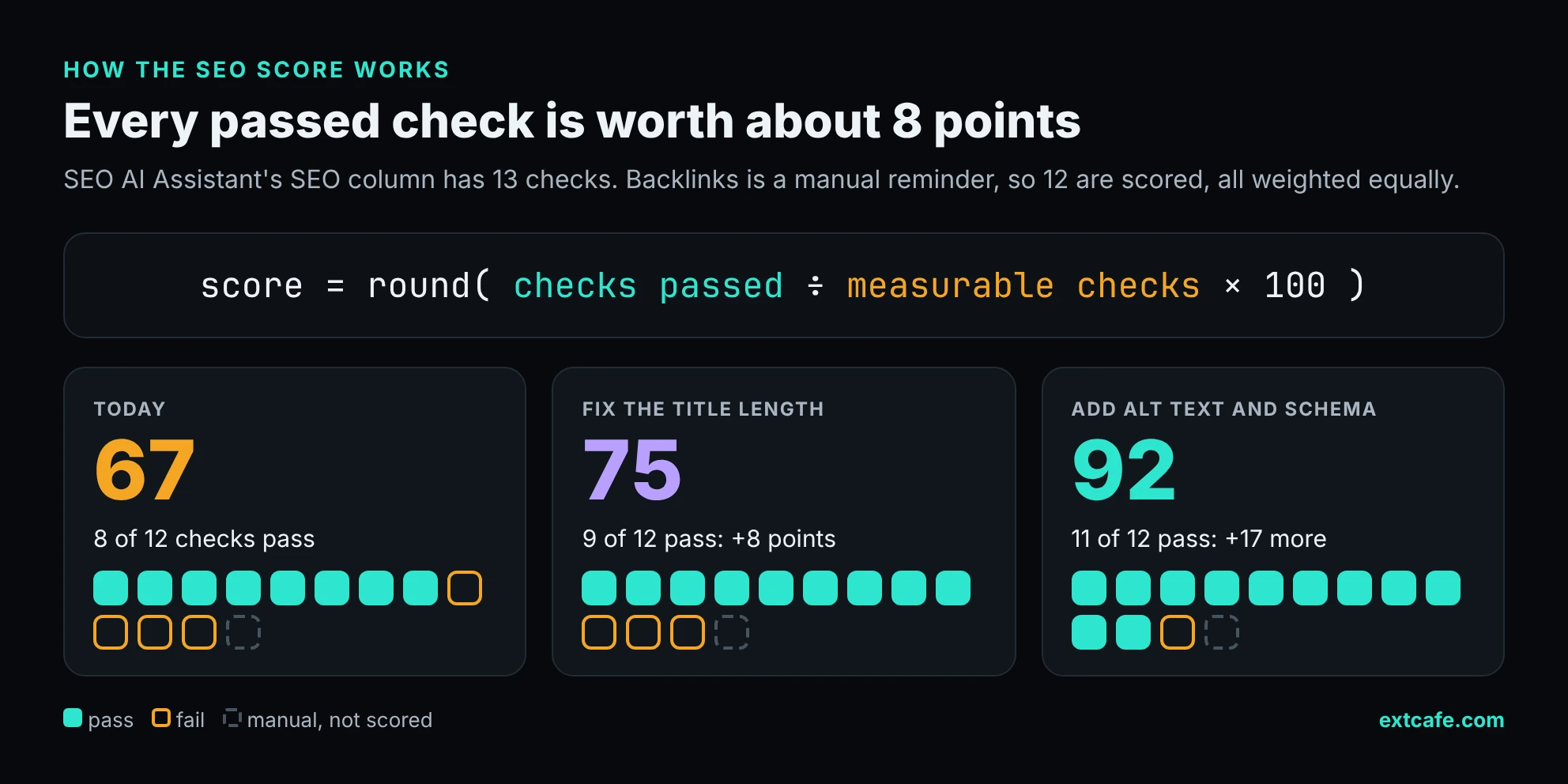
SEO AI Assistant runs 13 SEO checks on the page you are viewing. One, Backlinks, can't be judged from a single page, so it is shown as a reminder and left out. The score is:
SEO score = round( checks passed ÷ 12 × 100 )Every check counts equally. That makes the number easy to verify by hand, and it means the extension can show exactly what a fix is worth: next to each failed check you see the points it adds, usually 7 to 9 because of rounding. If the browser can't measure page speed (for example, the page loaded in a background tab), that check shows "Couldn't measure" and is left out instead of failing. The full method is on our how scores work page.
Two more things to keep in mind. Some checks are heuristic: simple text rules that can be wrong both ways, so treat them as a prompt to look. And the score covers one page, as it loaded in your browser; a cookie banner or a logged-in view can change a result.
What is a good SEO score out of 100?
There is no official good score. Google doesn't publish page scores, and a 100 doesn't guarantee rankings, because rankings also depend on competition, content quality and authority. As a working rule for our checklist: below 60 means basic gaps that are usually quick to fix; 75 to 90 means a sound page with a few gaps; above 90 means the page passes nearly every measurable check, and further gains come from better content and links, not the checklist.
In what order should I fix things?
- Anything that stops indexing. A stray
noindex, a robots.txt block or a canonical pointing elsewhere hides the page entirely, whatever the score says. - Technical hygiene: HTTPS, canonical, broken links, robots.txt and sitemap.
- The 10-minute fixes: title, meta description, headings, alt text.
- The bigger jobs: schema, internal links, page speed.
Our SEO fix priority guide explains the reasoning, and the extension's "Start here" card picks the three changes that matter most on each scan.
The 12 scored SEO checks and how to fix each
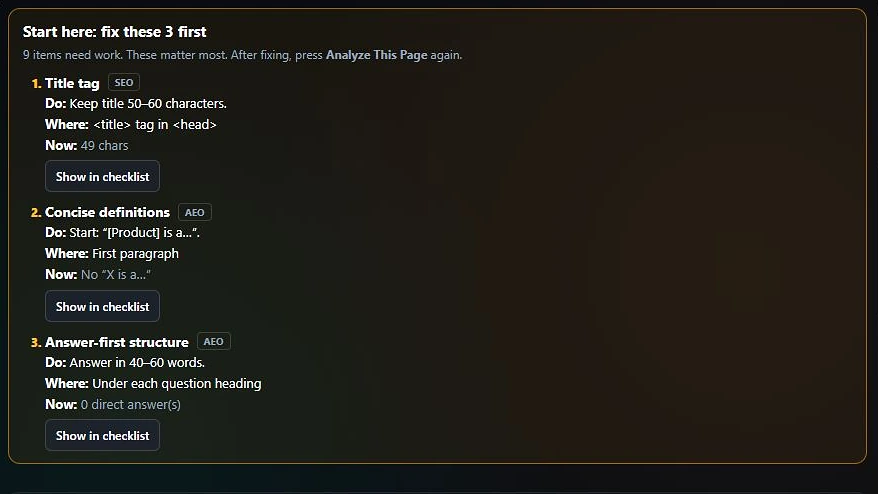
Each check below matches the extension's panel, with the exact pass rule from our scoring page.
1. Title tag
Passes when: the title is 50 to 60 characters long.
Why it matters: The title is the blue link in search results and the first thing an AI tool reads about the page.
How to fix it: Put the main topic first, then a benefit or detail, then your brand. Example: "Eggless Birthday Cakes in Pune, Same-Day Delivery | Rosewood". Count the characters; the extension shows the current length.
2. Meta description
Passes when: the meta description is 150 to 160 characters long.
Why it matters: Google sets no fixed length and often rewrites snippets, but a full, specific description gives it a good option and earns clicks.
How to fix it: Write one or two sentences that answer "what will I get on this page?" with a concrete detail such as a price, a number of steps or a location.
3. URL slug
Passes when: the path is 75 characters or less, lowercase, has no underscores, spaces or encoded characters, has 4 or fewer segments and no query string.
Why it matters: Short, readable URLs are easier to share and to understand at a glance.
How to fix it: Use a few lowercase words joined by hyphens, such as /eggless-cakes/. If you change the URL of a live page, add a 301 redirect from the old one.
4. H1 and headings
Passes when: the page has exactly one H1 and at least one H2.
Why it matters: Headings show people and machines how the page is organised.
How to fix it: Make the page title the only H1, then break the content into sections with H2 headings. In most site builders this is the "Heading 1" and "Heading 2" style, not bold text.
5. Keyword research
Passes when: the page's most frequent word (ignoring words such as "the" and "and") appears in the title.
Why it matters: This is a rough sign that the title and the text are about the same thing. It is a heuristic, so read it as a prompt to look.
How to fix it: Make sure the title names what the page is mostly about. If the most frequent word is something odd, such as "click", rewrite that text instead.
6. Keyword placement
Passes when: that same word appears in the first 100 words and in an H1 or H2.
Why it matters: Readers, and answer engines, decide fast whether a page fits their question.
How to fix it: Say what the page is about in the first paragraph, and use the topic word in at least one heading. Don't repeat it unnaturally.
7. Image alt text
Passes when: no image is missing alt text.
Why it matters: Alt text describes images for screen reader users and for search engines.
How to fix it: Add a short description to every meaningful image. This check also counts an empty alt="" as missing, so purely decorative images are better added as a CSS background. The extension lists every image without alt, with its address.
8. Page speed
Passes when: First Contentful Paint is 1.8 seconds or less and Cumulative Layout Shift is below 0.1, measured on this page load.
Why it matters: A slow or jumpy page loses visitors before they read anything.
How to fix it: Compress and resize images (WebP is a good default), set width and height on images so the layout doesn't jump, and remove scripts you don't need. This is one reading from your browser; check real-user data in PageSpeed Insights.
9. Mobile-friendly
Passes when: a viewport meta tag with width=device-width exists and the page doesn't scroll sideways.
Why it matters: Google indexes the mobile version of pages, and most local searches happen on phones.
How to fix it: Add <meta name="viewport" content="width=device-width, initial-scale=1"> to the head. If the page still scrolls sideways, look for wide tables or images and make them shrink or scroll inside their box.
10. Schema markup
Passes when: at least one JSON-LD schema type is found.
Why it matters: Structured data tells machines what the page is: an article, a product, a local business, an FAQ.
How to fix it: Add a JSON-LD block that matches the page, such as Article, Product or LocalBusiness. Only mark up what is visible on the page.
11. Internal linking
Passes when: the page links to at least 3 different paths on the same site.
Why it matters: Internal links help people and crawlers find related pages and understand how your site fits together.
How to fix it: Link to related guides, product or service pages and your contact page, with descriptive link text instead of "click here".
12. Technical hygiene
Passes when: the page uses HTTPS, has a canonical tag, has no broken links among the first 20 same-site links, and the site has a robots.txt and a sitemap.
Why it matters: These basics stop duplicate URLs, dead ends and crawl problems.
How to fix it: Turn on SSL in your hosting panel, add <link rel="canonical" href="…"> pointing to the page's own address, fix or remove broken links, and make sure /robots.txt and /sitemap.xml exist. Most hosts and CMSs can generate the last two.
Not scored: Backlinks. No tool can count your backlinks from one page. The extension links to the free Links reports in Google Search Console and Bing Webmaster Tools instead of guessing a number. See how to get backlinks.
Quick fixes for low AEO and GEO scores
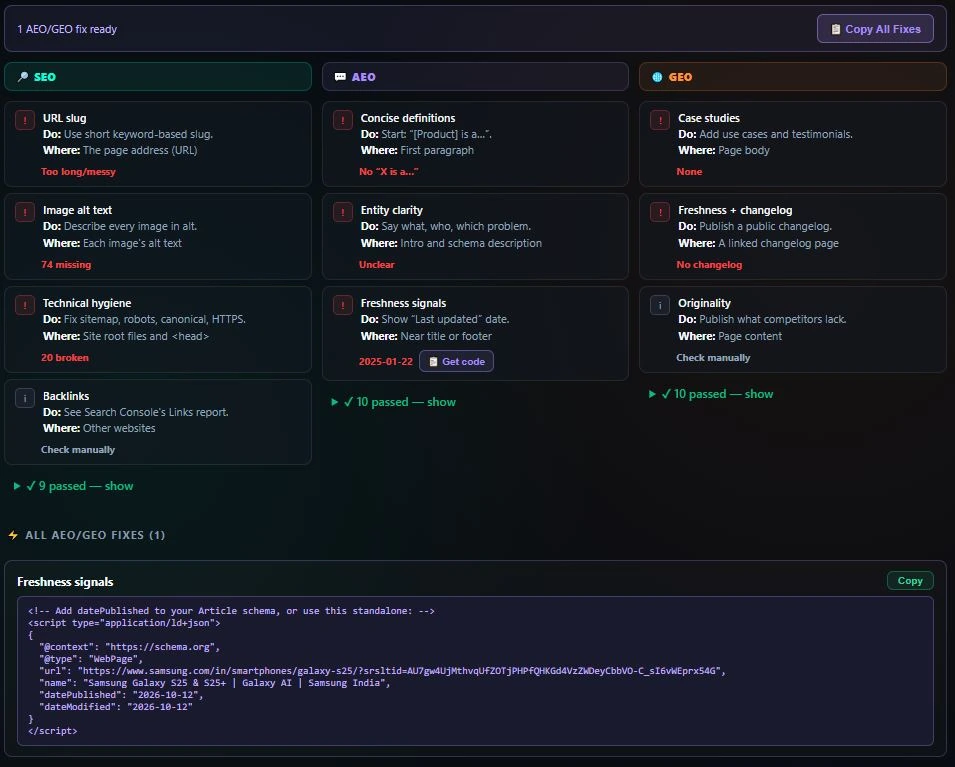
The AEO and GEO columns measure how easy a page is for answer engines to quote and trust. The fixes that move them most:
- Question headings with a short answer under each: at least two H2 or H3 headings phrased as questions, one followed by a 40 to 60 word answer (AEO: Question headings, Answer-first structure).
- A one-line definition near the top, such as "X is a…" (AEO: Concise definitions, Entity clarity).
- A named author with a byline, an About link and contact details (GEO: Expert authorship). See what E-E-A-T is.
- Links to at least two outside sources you actually used (GEO: Citations).
- A visible date, updated when you really change the page (AEO: Freshness signals).
- A robots.txt that allows AI search crawlers (GEO: Allow AI crawlers). Our guide on checking if AI search can see your site covers it.
What should I do after fixing?
- Publish the changes, reload the page and analyze it again. The score updates straight away.
- Check the score trend chart to see progress over time; history is saved in your browser.
- Ask Google to recrawl important pages with URL Inspection in Search Console. Rankings, if they change, take days or weeks, not minutes.
- Watch the page so a later edit doesn't undo your work. SEO AI Assistant Pro re-scans watched pages daily and alerts you only if a score drops, and TrackLens can alert you when a title, canonical or
noindexchanges.
See your score and the fix for each check
SEO AI Assistant is a free Chrome extension that runs 39 SEO, AEO and GEO checks from Chrome's side panel, shows how many points each fix adds, and writes your most important fix for you on every scan. No account needed for the scores, checks, recommendations, trend chart or Excel export.
SEO score questions
What is a good SEO score out of 100?
There is no official standard, because Google doesn't publish page scores. On SEO AI Assistant's checklist, below 60 usually means quick basic gaps, 75 to 90 a sound page with a few gaps, and above 90 a page that passes nearly every measurable check.
How do I check the SEO score of a page?
Open the page in Chrome, open an on-page SEO checker such as SEO AI Assistant in the side panel and press Analyze. It shows the score, every check with pass or fail, and what to fix.
Why is my SEO score low when my page ranks well?
A checklist score and rankings measure different things. A page can rank on strong content and links while missing a meta description or alt text. Fixing the checks removes weak spots but doesn't guarantee higher rankings.
How much does each fix raise the SEO score?
In SEO AI Assistant, about 8 points: the SEO score is based on 12 equally weighted checks, so each one is worth 1/12 of the score, shown as 7 to 9 points because of rounding.
Why did my SEO score change without any edits?
Some checks depend on how the page loaded, such as page speed, layout shift and broken links. A slower network, a cookie banner or a logged-in view can change results between runs.
Does a 100 SEO score guarantee first-page rankings?
No. It means the page passes every measurable check on the list. Rankings also depend on competition, content quality, authority and how well the page answers the search.
Why do different SEO tools give different scores?
Each tool uses its own checklist and weights. Compare the specific issues they find, not the numbers.
What should I fix first on a low-scoring page?
Anything that stops indexing, such as noindex, a robots.txt block or a wrong canonical, then HTTPS, broken links and sitemap, then quick wins like the title, meta description, headings and alt text.