Website Change Monitoring Use Cases: Price Drops, Competitors, Jobs and Policy Updates
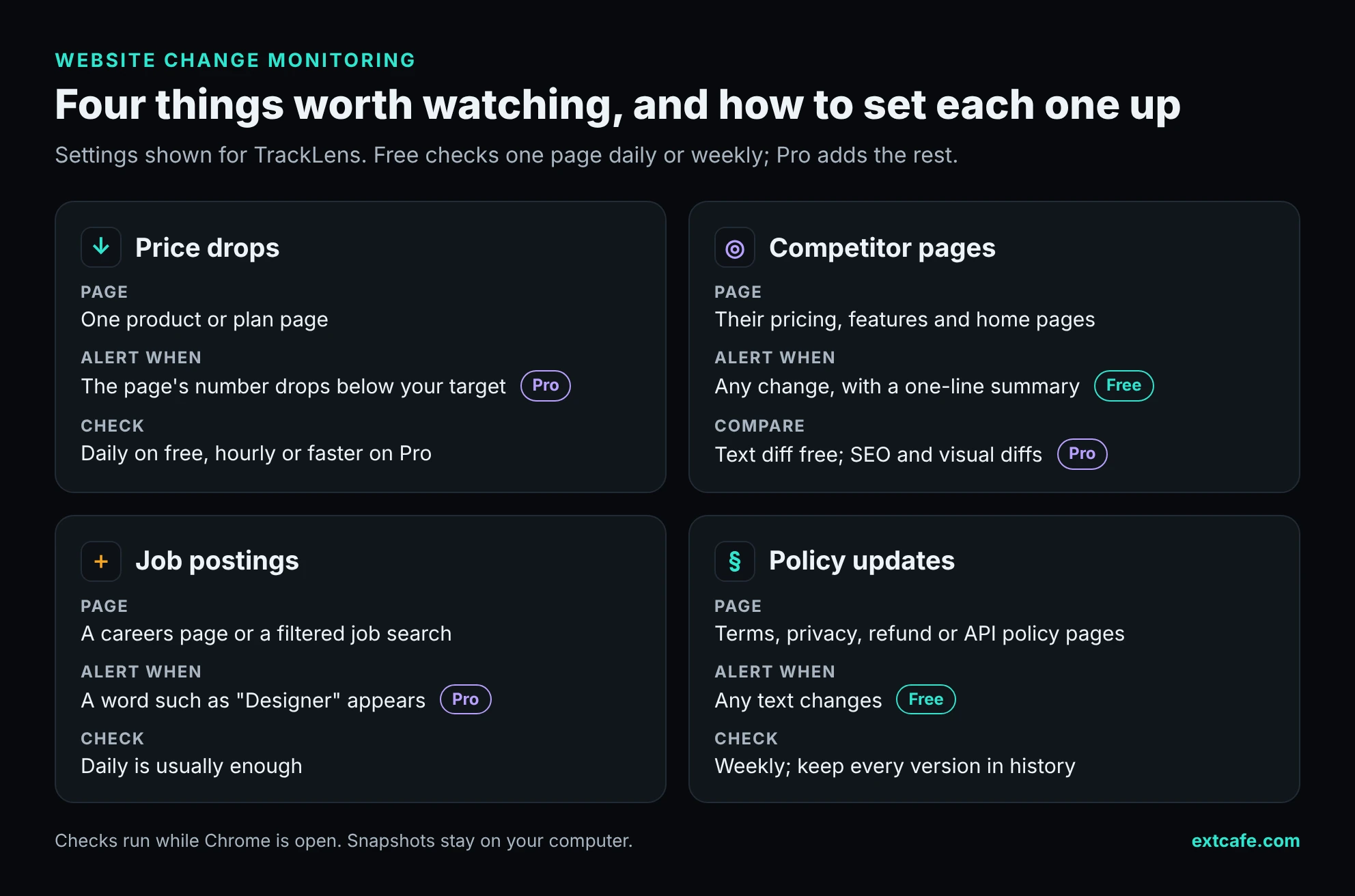
Short answer: Website change monitoring saves a copy of a page, checks it again on a schedule, and alerts you when it changes. The four most useful jobs are: catching a price drop on a product you want, watching competitors' pricing and feature pages, spotting new job postings on a careers page, and keeping a dated record of terms and privacy policy changes. Set each one up differently: a number condition for prices, any change for competitors and policies, and a word condition for jobs.
Most people install a page monitor for one reason, such as a price they are waiting on, and then find it useful for much more. Below are the four jobs we see most, with the exact settings for each in TrackLens, ExtCafe's free website change tracker for Chrome. The same ideas work in any monitor; if you are still choosing a tool, see our comparison of free alternatives to Visualping, Distill and ChangeTower.
How does website change monitoring work?
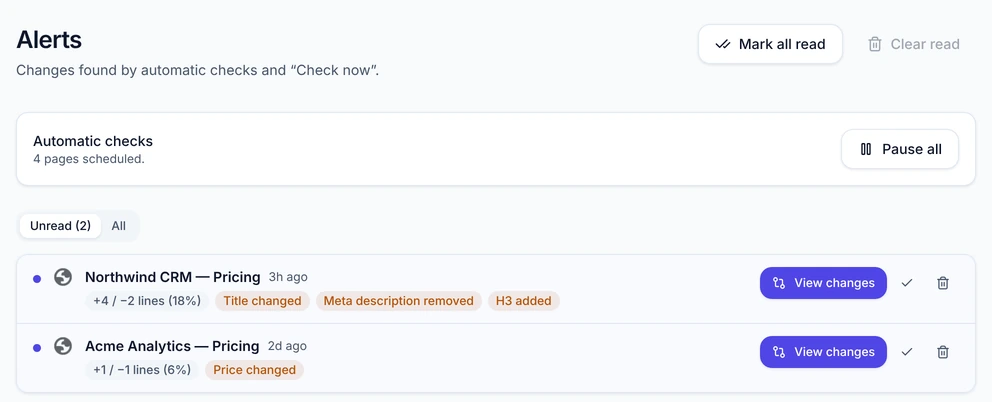
A monitor saves a snapshot of the page: its text, and in some tools its HTML, SEO tags and a screenshot. On a schedule it loads the page again and compares the new version with the last one. If something changed, it alerts you and shows the difference. In TrackLens every alert starts with a plain-language line worked out on your device, such as "Pro plan: $49 changed to $39".
A browser extension like TrackLens checks pages while Chrome is open and keeps snapshots on your computer, with no account. If you need checks around the clock with your laptop shut, a hosted service is the better fit.
1. How do I get a price drop alert for any website?
Use this for a product you want to buy, a flight or hotel page, or a software plan you're waiting to go on sale.
- Open the product page and click Track this page in the TrackLens side panel.
- In the page's rules, set Track only this element to the price box, using the point-and-click picker, so the rest of the page can't trigger alerts (Pro).
- Under smart alerts, choose The number drops below and enter your target price (Pro). TrackLens reads the first number in the tracked text, so tracking only the price matters here. Keep Ignore numbers off.
- Pick how often to check. Daily is enough for most products; Pro can check every hour or even every 15 minutes for fast-moving deals.
On the free plan you can still track the page daily and read each alert's summary line, which shows a price change such as "$49 changed to $39". If you shop on Amazon.in and Flipkart, DealFinder compares both prices side by side in one click.
2. How do I track competitor website changes?
Competitors announce price changes, new features and new offers on their own pages first. Track three pages per competitor: pricing, the main features or product page, and the homepage.
- Add each page by its address from the TrackLens dashboard. You don't need to visit it first.
- Leave the alert on Any change. Every alert says what changed in one line, so you can skim them.
- Open the comparison to see the text diff (free). With Pro, the SEO diff shows when they change a title, meta description, headings or schema, and the visual diff shows layout and image changes.
- Add a label or note to important snapshots, such as "Black Friday offer", to build a timeline of their moves.
For the full method, including how to compare their content and keywords with yours, see how to do a competitor SEO analysis.
3. How do I get an alert for new job postings?
Job boards send emails, but company careers pages often don't. A monitor fills the gap, whether you are job hunting or watching who a competitor is hiring (a new "Head of Sales, Germany" post says a lot about their plans).
- Open the careers page, or a job search filtered to the role and city you want, and track it.
- Set a smart alert: This text appears, with a word such as "Designer" or "Remote" (Pro). Text matching ignores upper and lower case.
- Check daily. New roles rarely need faster alerts than that.
Without Pro, leave it on any change: you will get an alert whenever the list of roles changes, with a summary of the new lines.
4. How do I monitor terms of service and privacy policy changes?
Terms, privacy policies, refund rules and API policies change quietly, and the old version is often gone. If you rely on a supplier, a platform or an app store, you want a dated copy of each version.
- Track each policy page and leave the alert on Any change.
- Check weekly. Policies rarely change more often, and a weekly check is free for one page.
- When an alert arrives, open the text diff to see exactly which sentences were added or removed.
- Keep the snapshots. TrackLens keeps 20 per page on the free plan and unlimited on Pro, and you can export a backup.
A snapshot is a record for your own reference. If a policy change matters legally, also save the page with the Wayback Machine, which keeps a public, dated copy.
What else is worth monitoring?
- Your own important pages. Catch a redesign or plugin update that drops a title, adds a
noindexor removes your schema. See how to redesign a website without losing SEO. - Back in stock. Set This text disappears with "Sold out" or "Out of stock" (Pro).
- Government and exam notices. Results, admit cards, forms and deadlines are often posted on a plain page with no email list.
- Documentation and changelogs of tools you depend on, so you hear about breaking changes early.
- Local competitors found with LocalBoost, which lists the top 3 businesses for a Google Maps search with links to their websites.
How often should I check each page?
| Use case | Check every | Alert when | Plan |
|---|---|---|---|
| Price drop | Day (hour or 15 minutes for flash deals) | The number drops below your target | Pro for the condition |
| Competitor pages | Day | Any change | Free for one page, Pro for all |
| Job postings | Day | This text appears | Pro for the condition |
| Policy updates | Week | Any change | Free for one page |
| Back in stock | Hour to day | "Sold out" disappears | Pro |
Checking more often than a page changes only adds noise. Our guide to monitoring website changes explains how to choose.
How do I keep alerts quiet and useful?
- Ignore the noisy parts. Rotating banners, dates, ad slots and cookie notices cause most false alarms. Skip them with ignore rules, by CSS selector or the element picker (Pro).
- Use a condition. A smart alert fires only when the thing you care about happens, while every other change is still saved quietly to history.
- Use a change-size threshold for long pages: At least this much of the page changes skips one-word edits (Pro).
- Read the weekly digest instead of every alert if you track many pages. TrackLens has an optional weekly "what changed" summary.
Try these setups free with TrackLens
TrackLens is ExtCafe's website change tracker for Chrome. The free plan tracks 3 pages with 20 snapshots each, checks one page automatically daily or weekly, and starts every alert with a plain-language summary. Pro is a one-time $19.99 (₹999 in India), with no subscription, and adds checks on every page from every 15 minutes, smart alerts, SEO and visual diffs, ignore rules and HTML report export. No account, no analytics, and snapshots stay on your computer.
Change monitoring questions
What is website change monitoring used for?
Mostly for price drop alerts, tracking competitor pricing and feature pages, spotting new job postings, keeping a record of terms and policy changes, and catching unwanted changes on your own site, such as a lost title tag or a new noindex.
Can I get an alert when a price drops on any website?
Yes. Track the product page, limit tracking to the price element, and set an alert for when the number drops below your target. In TrackLens this is a Pro smart alert; the free plan still alerts on any change with a summary such as "$49 changed to $39".
How do I get notified when a company posts a new job?
Track the company's careers page or a filtered job search, and set an alert for when a word such as the job title appears. Check once a day.
How can I tell when a website changes its terms of service?
Track the terms page with a weekly check and an alert on any change. The text diff shows exactly which sentences were added or removed, and each version is kept in history.
Is it legal to monitor a competitor's website?
Viewing public pages that anyone can open is normal market research. Check a page no more often than you need, respect the site's terms, and don't monitor pages behind someone else's login.
Does a Chrome extension check pages when my computer is off?
No. A browser extension checks pages only while Chrome is open. For checks around the clock, use a hosted monitoring service.
How many pages can I monitor for free?
With TrackLens, 3 pages with 20 snapshots each, and one of them checked automatically daily or weekly. Other tools have their own free limits; see our comparison of free alternatives.
How do I stop false alarms from website change alerts?
Ignore rotating parts such as banners, dates and ads, track only the part of the page you care about, and use a condition such as a word appearing or a price dropping instead of alerting on every change.