Local SEO Without a Website: How Small Businesses Get Found on Google Maps
Short answer: Yes, a small business can be found on Google Maps without a website. Google ranks local results by relevance, distance and prominence, and most of what you can control lives in your free Google Business Profile: the right primary category, complete details, real photos, and a steady flow of reviews you reply to. A website still helps, because it adds information Google and customers use, but it is not required to appear on Maps. Start with the listing, then add even a one-page site.
Plenty of good local businesses, such as tailors, tutors, plumbers and home bakers, have no website. That's fine for getting started. People searching "near me" on Google Maps see your Google Business Profile long before they see any website. This guide shows what to focus on when the listing is all you have.
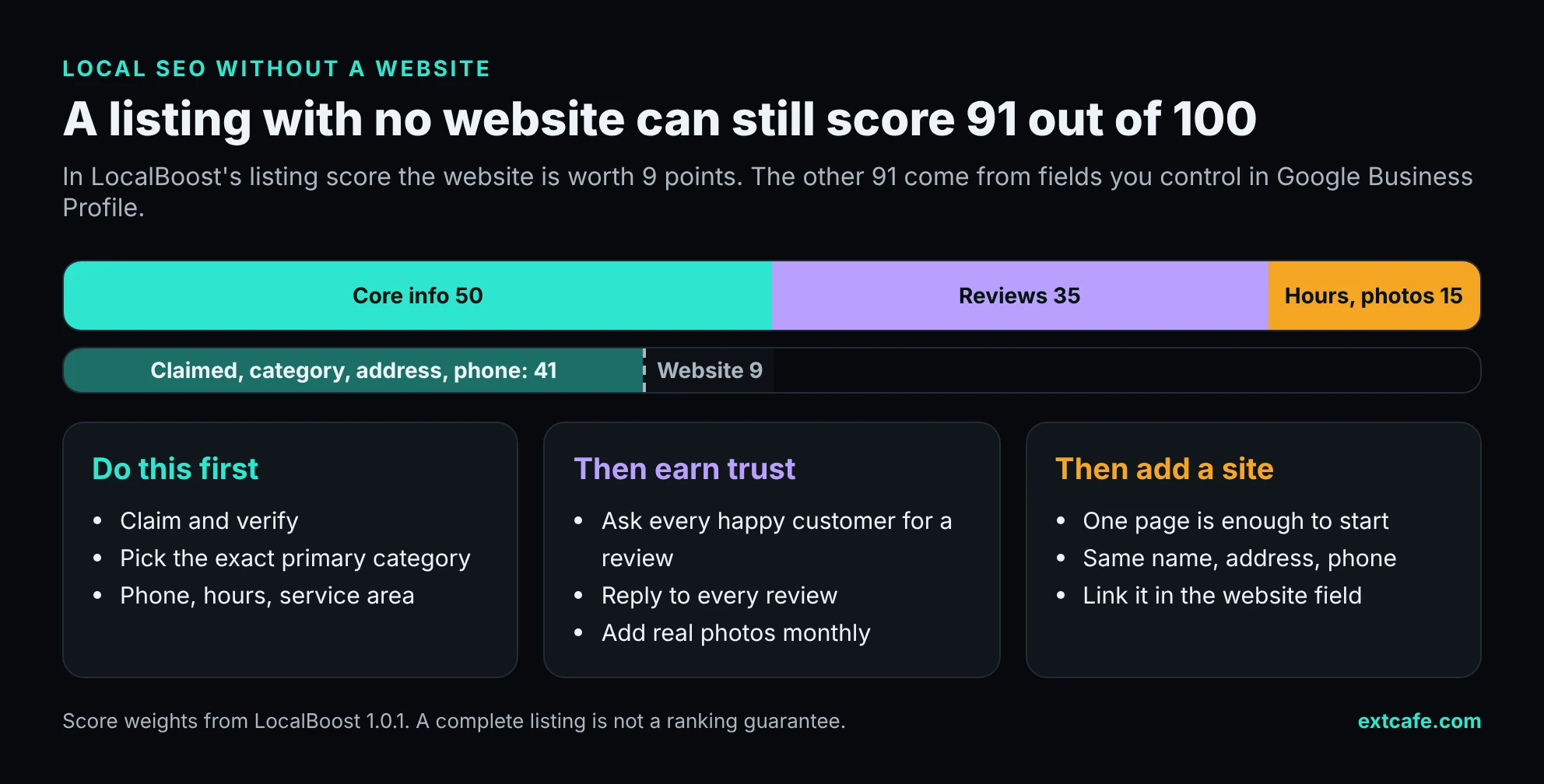
Can you rank on Google Maps without a website?
Yes. A Business Profile can be created and verified without a website, and it can appear in Google Maps and the local results in Search. The website field is optional.
One thing has changed, though: Google used to let you build a simple free website inside Business Profile. Google turned those sites off in March 2024, and they redirected visitors to the profile only until 10 June 2024. If an old marketing guide tells you to "use your free Google website", that option is gone.
How does Google rank local businesses?
Google's own help page, Tips to improve your local ranking on Google, names three factors:
- Relevance: how well your profile matches the search. Your category, services and description drive this.
- Distance: how far your business is from the searcher or the place in the search. You can't change this, apart from setting your service area correctly.
- Prominence: how well known your business is. Google says this draws on information from across the web, such as links, articles and directories, and that review count and score factor in.
That last point is where a website helps: it is one more source of information about you, and other sites can link to it. Without one, lean harder on reviews and on listings elsewhere. More detail is in our guide to ranking in the Google Maps top 3.
Treat your Business Profile as your website for now
Customers will decide to call you from the listing alone, so give it everything a homepage would have:
- What you do: the most specific primary category that fits (for example "Bridal shop", not just "Clothing store"), a few accurate secondary categories, and your services with short descriptions.
- Where and when: your address, or a service area if you visit customers and don't want your home address shown, plus opening hours and holiday hours.
- How to reach you: a phone number you actually answer, and messaging or booking links if you use them.
- Proof: real photos of your work, your premises and your team, and reviews with your replies.
- What's new: regular posts about offers, events or new products.
8 steps for a business with no website
- Claim and verify your profile. Search your business name on Google Maps; if a listing exists, claim it, otherwise add it at google.com/business.
- Pick the exact primary category. It is the single strongest relevance signal you control. Look at what the top-ranking businesses in your area use.
- Use your real business name. Don't add keywords or a city to the name; Google's guidelines don't allow it and it can get a listing suspended.
- Fill every field you can. Hours, phone, services, products, attributes and a 750-character description that says what you do and where.
- Add real photos every month. Your work, your shopfront and your team. Skip stock photos.
- Ask every happy customer for a review, with a direct link, and reply to every review, good or bad. Our guide to getting more Google reviews has reply templates.
- Post updates. Offers, seasonal services and events show the business is active.
- Keep your name, address and phone identical everywhere, on every listing and social profile.
Our 12-step Google Business Profile checklist goes deeper on each field.
Where else can I list my business for free?
Each accurate listing is another place customers, and search engines, can find your details. Start with the ones people in your area actually use:
- Bing Places for Business, which feeds Bing Maps.
- Apple Business Connect, which feeds Apple Maps on iPhones.
- A business page on the social network your customers use most, with the same name, address, phone and hours.
- Respected local and industry directories in your country.
Quality beats quantity. Ten accurate listings help more than fifty half-filled ones, and every listing you create is one more you have to keep up to date.
When is it time to get a website?
Your listing can carry you a long way, but a website starts to pay off when:
- customers ask the same questions about prices, menus or service areas that a listing can't fully answer;
- you want to rank for searches beyond your immediate area, or for specific services;
- you want people to book, order or pay online without a phone call;
- competitors in the top 3 all link to a website and you don't.
A single page with your services, prices, area, hours, phone and a few photos is enough to start. Use the same name, address and phone as your listing, then add the address to the website field in your Business Profile. Our step-by-step guide on how to get a website for your local business covers domains, hosting and builders.
How do I check my listing in 5 minutes?
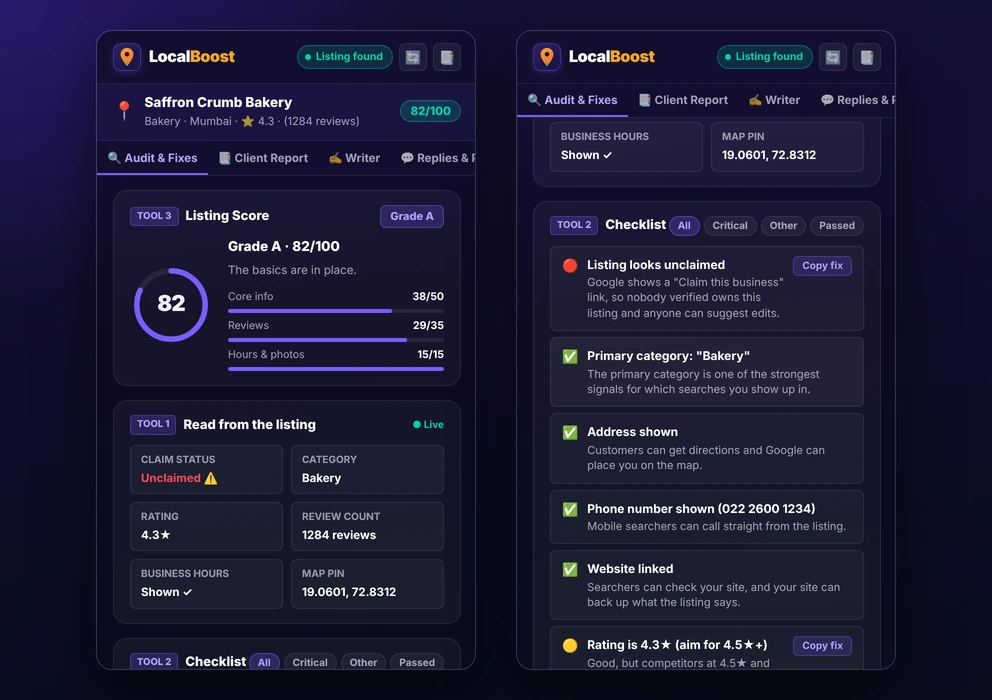
Open your business on Google Maps and compare it with the top 3 for your main search. Look at the category, review count and rating, photos, hours and whether each has a website. LocalBoost does this for you: it scores the listing out of 100 from what Google Maps shows publicly, runs the search on Maps to show your real position and the top 3, and gives a fix for each gap. When a listing has no website, LocalBoost marks it as a failed check, tells you where to add one in your profile (Edit profile, Contact, Website), and its next-steps card suggests a quick way to start a site, through a clearly marked Hostinger affiliate offer. Our guide on how to audit a Google Maps listing for free walks through it.
Audit your Google Maps listing free
LocalBoost is ExtCafe's free Chrome extension for local SEO. It scores the Google Maps listing you have open out of 100, gives a fix for every gap, shows where the business really ranks against the top 3, and builds a client report. Every number is read from Google Maps itself. No account, no server, and nothing leaves your computer. It works on google.com/maps in English.
Local SEO without a website questions
Can I have a Google Business Profile without a website?
Yes. The website field is optional, and a profile without one can be verified and shown on Google Maps and in local search results.
Does Google still offer free websites for Business Profiles?
No. Google turned off Business Profile websites in March 2024, and their redirect to the profile ended on 10 June 2024. You need to build a site elsewhere if you want one.
Does not having a website hurt my Google Maps ranking?
It can limit it. Google ranks local results by relevance, distance and prominence, and says prominence uses information from across the web, such as links, articles and directories. A website adds to that, but reviews, categories and a complete profile matter a lot too.
What should I put in the website field if I have no website?
Leave it empty until you have a page you control, such as a one-page site. Don't point it at a page with different business details.
How many reviews do I need to rank on Google Maps?
There is no fixed number. Google says review count and score factor into local ranking, so compare yourself with the businesses in the top 3 for your main search and aim to keep pace with them.
Can a home-based business hide its address on Google Maps?
Yes. A business that visits or delivers to customers can set a service area and hide its address. A business with a shop customers visit should show its address.
Is a social media page a good substitute for a website?
It helps as an extra listing with your details, but you don't control the platform, and it gives Google less information about your services than your own site would. Use it alongside your Business Profile, not instead of a website forever.
What is the cheapest way to get a business website?
A one-page site on a website builder or low-cost hosting, with your own domain name. It should list your services, prices, area, hours and phone, matching your Business Profile.